Cabinet
24/7 Support
24/7 Support

When it comes to choosing a hosting provider, most users pay attention to price, disk space, or server speed. However, in practice, it is the hosting control panel that determines how convenient it will be for you to work with the site on a daily basis. It is responsible for managing files, domains, email, databases, and security — in fact, for all control over your project.
Today, there are several popular solutions on the market, among which cPanel, Plesk, and hPanel are most often mentioned. Each hosting control panel has its own philosophy, level of complexity, and set of features: some are geared toward professionals, while others are geared toward beginners who want to launch a website without unnecessary technical difficulties.
In this article, we will take a detailed look at what a hosting control panel is, what functions it performs, and provide a clear and practical overview of cPanel, Plesk, and hPanel. This will help you choose the best solution for your website or business.
A hosting control panel is a special web interface that allows you to manage your website and hosting account without in-depth technical knowledge. In fact, it is a convenient control panel through which the user interacts with the server: uploads files, configures domains, creates mailboxes, works with databases, and controls website security.
To answer the question of what a hosting control panel is directly, it is a tool that replaces complex work with the server via the command line and makes website administration understandable even for beginners. It is thanks to the hosting control panel that the website owner can perform most tasks independently, without involving a system administrator.
The control panel plays a key role in website administration. It allows you to:
A modern hosting panel combines convenience, automation, and control, so choosing the right hosting control panel directly affects the stability of the site, the speed of service, and the comfort of daily work with the project.
Any modern hosting control panel is designed to simplify website and server space administration as much as possible. Whether it’s cPanel, Plesk, or custom hPanel, the set of basic functions remains similar and covers all key aspects of website operation.
Working with website files. The control panel allows you to upload, edit, copy, and delete files without using FTP clients. The built-in file manager allows you to quickly manage the site structure, change access rights, and work with archives directly in your browser.
Domain and subdomain management. Through the hosting control panel, you can connect new domains, create subdomains, configure DNS records, and set up redirects. This is especially important for websites with multiple projects or a multilingual structure.
Email. Most hosting panels allow you to create corporate mailboxes on your own domain. You can manage accounts, set limits, configure forwarding, auto-responders, and spam protection.
Working with databases. The control panel allows you to create and administer databases (most often MySQL or PostgreSQL), manage users and access rights, and work with them using convenient tools such as phpMyAdmin.
SSL certificates and security. The modern hosting control panel simplifies the connection of SSL certificates, including free Let’s Encrypt certificates. This provides a secure connection, increases user trust, and has a positive effect on SEO.
Backups. Backups are one of the most important features. Through the control panel, you can create backups manually or automatically, as well as quickly restore your website in case of errors, crashes, or data loss.
Thanks to these features, the hosting control panel becomes an indispensable tool for both beginners and experienced users, providing complete control over the site without unnecessary technical complications.
cPanel is one of the most popular hosting control panels in the world and has been the standard for Linux hosting for many years. It is used by large hosting providers as well as thousands of web studios and developers. Thanks to its stability, wide range of features, and intuitive logic, the cPanel hosting control panel remains a universal solution for various types of websites.
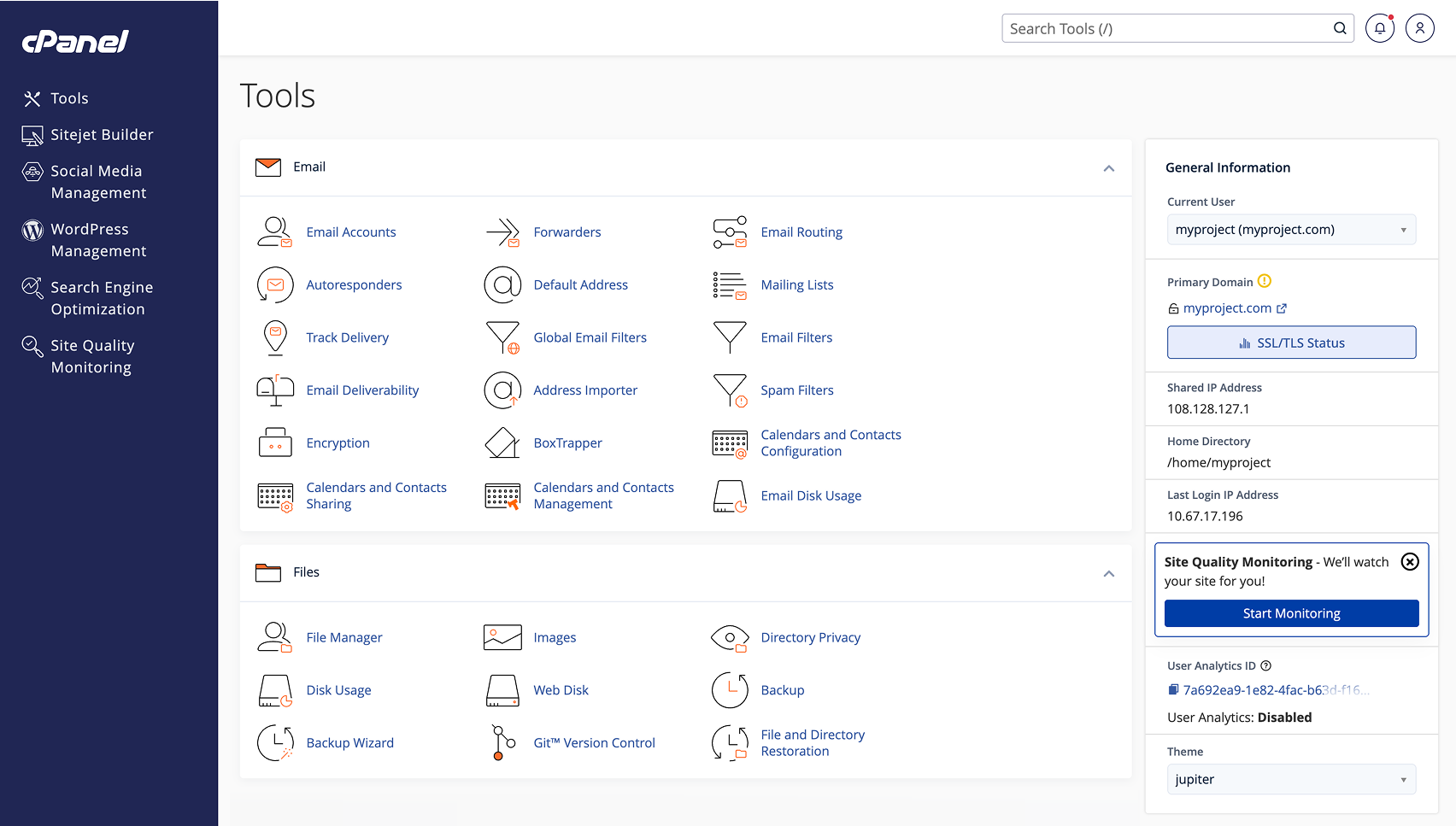
The cPanel interface is built on a modular principle: all tools are grouped by category—files, domains, mail, databases, security, statistics. Users access the panel through a browser, allowing them to manage their hosting from any device.
The principle behind cPanel is maximum process automation. Most actions, from creating a database to connecting SSL, can be performed in just a few clicks. The panel supports integration with popular CMS, backup tools, and monitoring systems, making it a powerful control panel for complex projects.
One of the main advantages of cPanel is its convenient and logically structured interface, which has been refined over the years and is familiar to most hosting users. The panel offers a wide range of features in its basic configuration, allowing you to manage files, domains, email, databases, and security without installing additional tools. An important advantage is the large number of integrations and third-party modules that extend the capabilities of the panel for specific tasks. Separately, it is worth noting the detailed documentation and active user community, thanks to which most issues can be resolved quickly. It is the combination of functionality and stable operation on most Linux servers that makes cPanel a popular hosting panel for commercial
Despite its popularity, cPanel has certain drawbacks. First of all, it requires a paid license, which affects the final cost of hosting for the user. On servers with limited resources, the panel can be quite demanding in terms of performance, which is not always the best solution for small projects. For absolute beginners, the structure and number of tools may not be entirely obvious at the initial stage. In addition, deep custom settings often require an understanding of the server side, which limits flexibility for users without technical experience.
cPanel is best suited for users who need a stable and time-tested hosting control panel with extensive capabilities. It will be convenient for owners of business websites, corporate resources, and online stores, where reliability, security, and the ability to quickly manage all components of the project from a single interface are important.
The cPanel hosting control panel is also well suited for web developers and web studios that work with multiple sites simultaneously and value process automation, integration with popular CMS, and predictable server environment behavior. For users with basic or intermediate technical knowledge, cPanel allows you to quickly master hosting management and subsequently scale your project without changing the platform.
Plesk is a popular hosting control panel that is often considered a full-fledged alternative to cPanel. It is distinguished by its modern approach to server management, flexibility, and broad support for various technologies. Thanks to this, the Plesk panel is actively used on classic web hosting, as well as on VPS and dedicated servers.
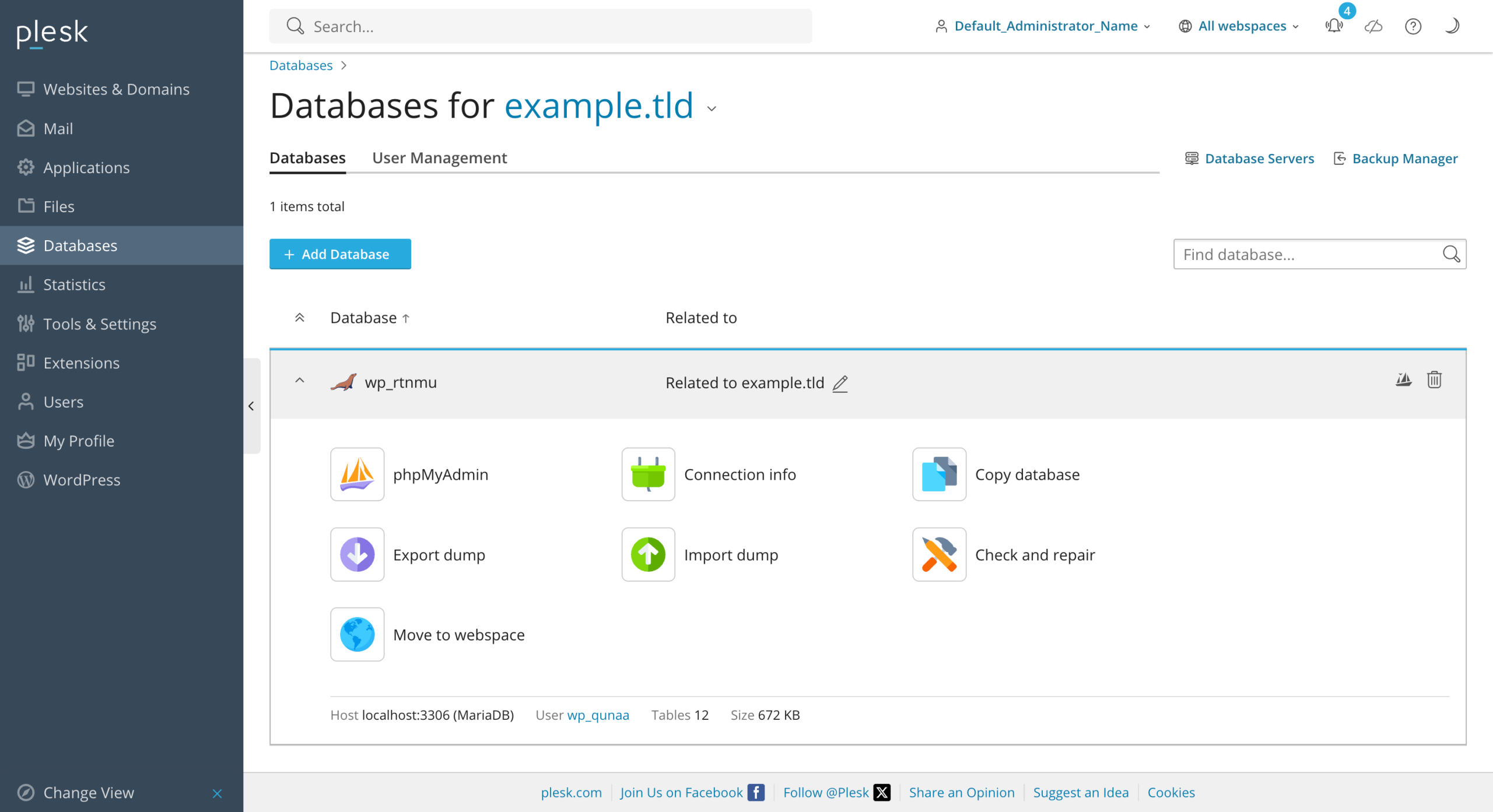
The Plesk interface has a modern, minimalist design and logical structure. All the main tools are concentrated in a single workspace, which simplifies navigation and project management. One of the key features is support for different operating systems—Plesk hosting can run on both Linux and Windows servers, which significantly expands its scope of application.
Plesk’s overall approach is focused on centralized management of websites, domains, databases, and security services. The panel integrates well with popular frameworks, containers, and development tools, making it a powerful hosting panel for modern web projects.
Among the main advantages of Plesk is its modern and intuitive interface, which looks more relevant compared to classic panels. An important advantage is its support for both Windows and Linux servers, which many competitors do not offer. In addition, the Plesk panel is convenient for developers thanks to its built-in tools for working with Git, Docker, and various programming languages.
One of the disadvantages of Plesk is its paid licensing model, which affects the final cost of hosting. For beginners, some settings may seem more complicated compared to simpler control panels. Also, with active use of advanced features, Plesk may require more server resources.
Plesk is the optimal solution for developers, agencies, and businesses that work with different technologies and require flexible hosting management. It is well suited for projects on Windows hosting, complex web applications, and users looking for a modern control panel with scalability and integration with professional tools.
hPanel is a custom hosting control panel developed by a hosting provider as an alternative to classic universal solutions. The main idea behind hPanel is to simplify website and hosting management for users without technical experience. Unlike universal panels, it is closely integrated with the provider’s infrastructure and focused on quick start.
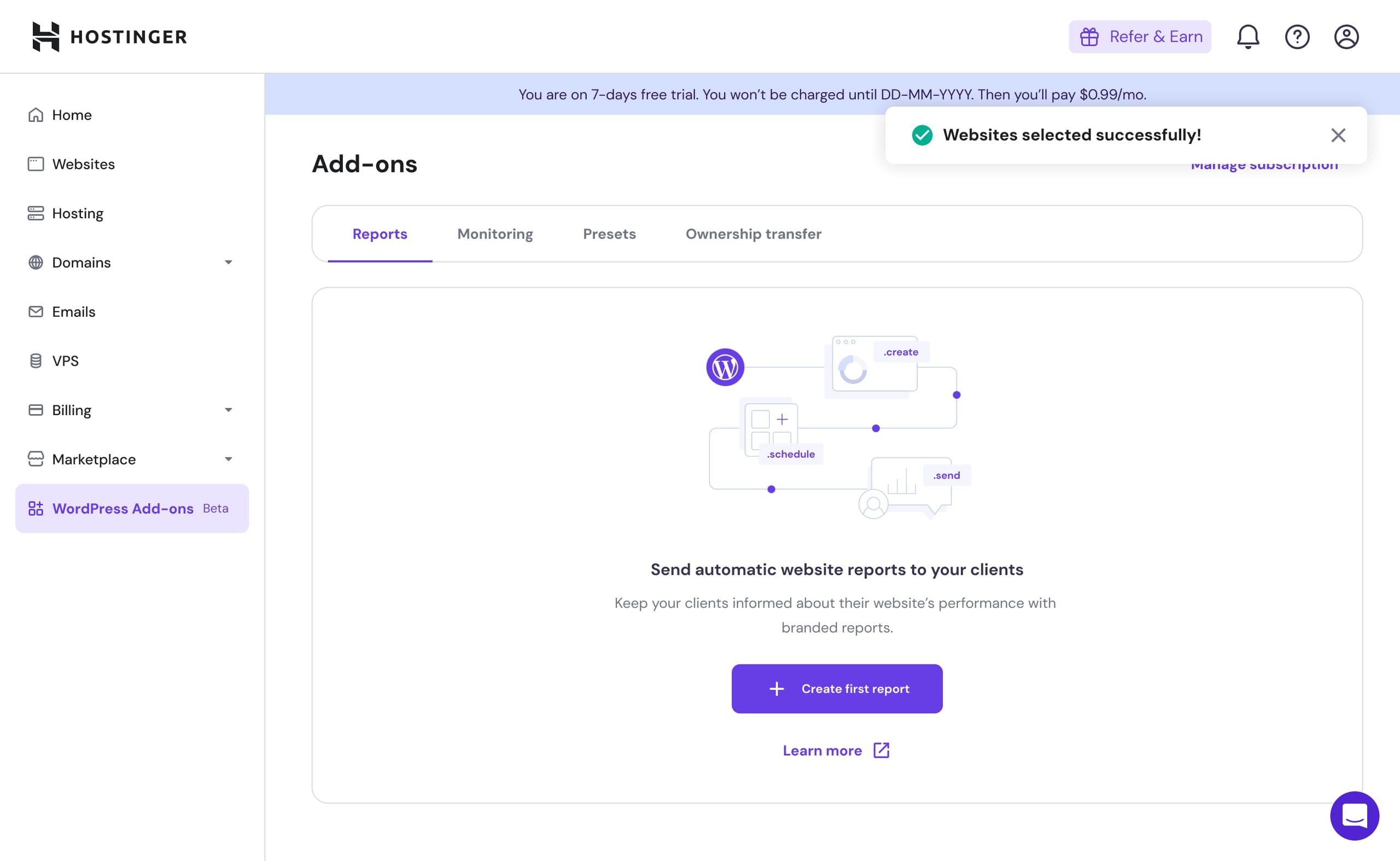
The hPanel interface has a modern, minimalist look and a logical structure, with all key tools gathered in one place. The philosophy behind this control panel is “nothing superfluous”: users see only those functions that are really necessary for launching and maintaining a website.
Among the main features of hPanel are file and domain management, mailbox creation, database management, SSL certificate connection, and backup. Many processes are automated, allowing you to perform standard actions in a few clicks without complex technical settings.
The main advantage of hPanel is its simplicity and clarity. The panel works quickly, is not overloaded with complex modules, and is well suited for those who are new to hosting. Thanks to optimization for a specific provider, the hosting control panel ensures stable operation and an intuitive user experience.
Among the limitations of hPanel, it is worth noting its attachment to a specific hosting provider—transferring a project to another hosting provider may require adaptation to a different panel. Also, hPanel usually has fewer advanced and in-depth settings, which can be critical for complex or non-standard projects.
hPanel is ideal for beginners, owners of small websites, landing pages, and simple business projects who need to get started quickly without diving into technical details. It is a good solution for those who are looking for a simple and intuitive hosting panel for basic website management and do not plan to use complex server configurations.
Below is a summary comparison of three popular hosting control panels based on key criteria: ease of use, functionality, price, and complexity. This will help you quickly understand which hosting control panel is right for your project.
Criterion
| cPanel | Plesk | hPanel | |
| Convenience | Time-tested interface, logical, familiar to most users | Modern, minimalist design, but a little more complicated for beginners | Intuitive and simple, beginner-friendly |
| Functionality | Very wide range of features and integrations, support for all basic tasks | Wide functionality, support for Windows and Linux, integration with development tools | More limited functionality, sufficient for small websites and basic projects |
| Price | Paid license, which increases the cost of hosting | Paid license, depends on the OS and number of sites | Usually included in the cost of hosting, no additional payments |
| Level of complexity | Medium, requires some experience for advanced settings | Medium/high, some features are difficult for beginners | Low, can be quickly mastered even by beginners |
The table shows that cPanel is suitable for those who value stability and broad functionality, Plesk is for projects with different operating systems and advanced needs, and hPanel is for beginners and small websites where simplicity and a quick start are important.
This comparison helps you navigate and choose the best hosting control panel for your specific project without wasting time testing all the solutions.
The choice of hosting control panel depends on your experience, website type, and functionality needs. If you are just starting out with web hosting, it is important to choose a simple and intuitive hosting panel that will allow you to quickly launch websites without technical difficulties. In this case, hPanel may be the best choice, as it is geared toward beginners and small businesses, allowing you to perform all basic tasks in just a few clicks.
For users with average technical knowledge and owners of business websites or online stores, cPanel or Plesk panels are more suitable. They provide a wide range of features, support for various CMS, and advanced capabilities for working with databases, domains, and security. It is important to pay attention to the type of server OS: cPanel only works on Linux, while Plesk supports both Linux and Windows.
Another important aspect is pricing and licensing policy. Some panels require a separate license fee, which affects the cost of hosting, while custom solutions are often included in the price. It is also worth assessing the need for integrations and advanced settings: if you are planning a complex or large-scale project, it is better to choose a more functional hosting control panel such as cPanel or Plesk, while hPanel is sufficient for small websites and simple landing pages.
Therefore, when choosing a control panel, consider your level of experience, website type, functionality requirements, and budget. This will enable you to select the most convenient and effective hosting control panel for your project.
The choice of hosting control panel directly affects the convenience of website administration, project launch speed, and server performance. cPanel remains the classic solution for those who value stability, broad functionality, and Linux server support, while Plesk is ideal for projects that require flexibility and support for both Linux and Windows. hPanel is simple and intuitive, making it ideal for beginners and small websites.
Choosing the right control panel not only saves time on routine tasks, but also ensures the reliable operation of your website and scalability in the future. Based on your level of experience, project type, and required functionality, you can select the optimal hosting control panel that fully meets your needs.
Response

We have been cooperating with Hostpark for several years. We are very pleased with the highly coordinated work! The company always provides quality services and offers favorable conditions. The technical support team responds quickly to requests and, if necessary, provides consultations and explanations. If you have any technical issues, the specialists solve everything promptly! We can safely recommend it.
Sincerely, Mykhailo Savinov, Director of Astelit LLC

AVA Group recommends Hostpark as a reliable partner that has been tested by time. You always stand up for your client's interests, and this is very gratifying. We wish you development and prosperity!
Sincerely, Maxym Shevchuk, President of AVA Group

CFJ Trading LLC expresses its gratitude to HOST PARK GROUP LLC for the successful implementation of the project on the introduction of a new virtual infrastructure hosting based on the Atman data center. Over the three years of cooperation, HOST PARK GROUP LLC has proved to be an expert in its field, with certified engineers and qualified technical specialists involved in the projects. The specialists of HOST PARK GROUP LLC actively participated in the design, construction of infrastructure in accordance with the project requirements, in the development and expansion of the data center, and in its active support. Engineering support in the data center itself was provided in a timely manner and at the appropriate professional level, and the implementation of new capacities was carried out with the highest quality and in the shortest possible time. We would like to note the high professional level of the specialists of HOST PARK GROUP LLC and thank them for the prompt and high-quality implementation of the project. All works were completed in full in accordance with the contractual obligations and terms of reference and in compliance with the deadlines. We look forward to further fruitful cooperation.
Sincerely, V.Yu. Cherniavskyi, Director of Business Development and Support Department, CFJ Trading LLC

Relocating a data center to another facility within Ukraine was already a challenging task even in peacetime. Moving it abroad, and under wartime conditions, was an even greater challenge. However, thanks to the Hostpark team, we were able to complete this process as smoothly and painlessly as possible. UNIVERSAL BANK is a major Ukrainian retail bank. Nearly 10 million citizens of Ukraine are our clients and loyal users of our mobile application, monobank. Ensuring uninterrupted access to our customers’ funds has always been our highest priority. However, with the onset of the full-scale war, fulfilling this task became extremely difficult — all of our data centers were located within Ukraine and were exposed to significant risks. As a result, a decision was made to quickly establish a fully operational data center within the European Union, using the network and server equipment already at our disposal. To accomplish this task, we required a competent partner with experience operating both in Ukraine and in the EU — and such a partner for us was HOSTPARK. The teams of UNIVERSAL BANK and HOSTPARK carefully developed a plan to relocate part of the Bank’s critical IT infrastructure from Ukraine to the EU, selected a suitable location for the equipment within the EU, resolved all related customs and organizational matters in both Ukraine and the EU, and successfully executed the migration plan while avoiding downtime and maintaining full control over the process. Currently, our equipment is hosted in one of the EU countries in a specialized data center that meets the highest industry standards. Our data centers in Ukraine and the EU are connected via high-capacity data transmission channels (with HOSTPARK once again acting as one of the providers). Over an extended period of operation, we have proven the reliability of this infrastructure in practice. We would also like to highlight the continuous support provided — we were always in close contact with the HOSTPARK team, and all issues were resolved promptly and professionally. We sincerely recommend HOSTPARK as a reliable partner for organizations seeking to ensure the highest level of stability and security for their IT infrastructure.
Yours sincerely,
Acting Chairman of the Management Board
JSC “UNIVERSAL BANK” Valerii ZADOROZHNYI












Ask us and our managers will contact you as soon as possible.