Cabinet
24/7 Support
24/7 Support
In the digital world, where every millisecond counts, your website’s loading speed directly affects your business success. If your website loads slowly, users will go to your competitors, your conversion rate will drop, and search engines will penalize you with a lower ranking. One of the most effective solutions to this problem is the implementation of a CDN (Content Delivery Network). In this article, we will explore how a content delivery network works, why it is critical for modern businesses, and how to set it up correctly with a reliable infrastructure.
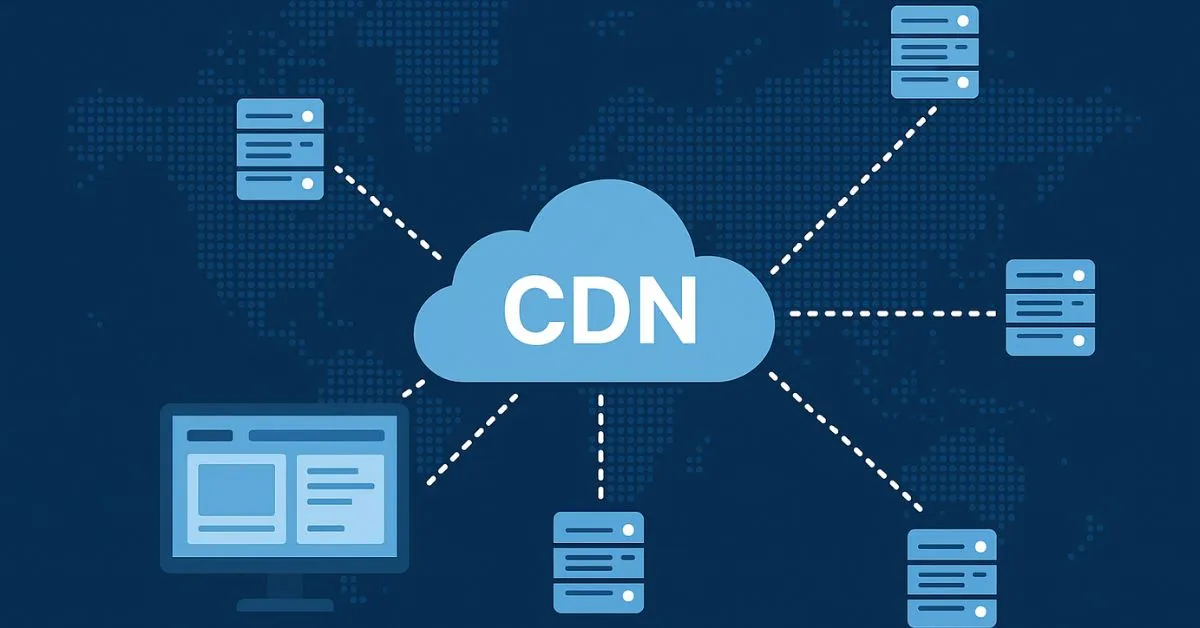
A CDN (Content Delivery Network) is a geographically distributed network of servers that interact to deliver web content to users quickly. Unlike traditional hosting, where all content is located on a single server in one location, a CDN stores copies of your website on multiple servers scattered around the world.
The essence of the work is simple: instead of a user from Australia waiting for data to arrive from your server in Ukraine, they receive content from the CDN server closest to them. This dramatically reduces loading time, increases stability, and improves the user experience. If you have servers in European Tier III+ data centers with pings from 13 ms to Ukraine (such as Atman, officially represented by Hostpark), then CDN becomes a natural addition to this infrastructure for a global audience.
CDN stores not only static files (images, CSS, JavaScript, videos), but can also cache dynamic content. Major technology platforms—Netflix, YouTube, Amazon, Facebook—all use CDN. In fact, more than 50% of global web traffic today passes through content delivery networks.
The history of CDN began in the mid-1990s, when the internet was just gaining momentum. At that stage, there was a critical problem: users around the world could not quickly download content due to geographical restrictions and limited network bandwidth.
The first commercial CDN solution appeared in 1998 with Akamai Technologies, founded by Tom Leighton from the Massachusetts Institute of Technology. Akamai revolutionized content delivery by using complex routing algorithms to determine the most optimal data transfer paths. This significantly reduced page load times at a time when internet speeds were much slower than they are today.
Since then, CDN has developed rapidly. In the 2000s, giants such as Limelight Networks and NetScaler appeared. However, the real revolution came in the 2010s with the launch of Cloudflare in 2009 and Amazon CloudFront in 2008, which made CDN accessible even to small and medium-sized businesses. Previously, CDN was a service only for large corporations, but now it is a tool that any webmaster can afford. Today, hosting providers combine European-level data centers with the ability to integrate CDN services for maximum customer flexibility.
CDNs are divided into several types depending on their architecture, functionality, and method of content distribution.
Push CDN is a model where the webmaster manually uploads content to CDN servers. This type is the most controllable, because you know exactly where your content is located. Push CDN is most often used for static content that rarely changes—large media files, downloadable materials, archives. The disadvantage of this model is that it requires more time to set up and maintain, but for companies that distribute large binary files, it is the best choice.
Pull CDN is the opposite model, where the CDN automatically “pulls” content from your main server upon the user’s first request. This is a more automated approach that does not require manual uploading. Pull CDN is ideal for dynamic content that is frequently updated. Most modern CDN services (Cloudflare, KeyCDN, Bunny CDN) use this principle because it allows companies to get started instantly without lengthy preparation.
A private CDN is a proprietary network of servers built by a large company for its own needs. For example, Netflix has a private CDN to optimize video streaming. This approach allows for complete control and optimization, but requires significant capital investment and technical resources.
Public CDNs are third-party services available to all companies on a paid basis. This is the most popular option for small and medium-sized businesses, as it eliminates the need for infrastructure investments.
Hybrid CDN is a combination of private and public CDN networks. Large companies often use this approach for optimal flexibility. In practice, this means that critical content is handled by a private network, while the rest is handled by a public CDN. Organizations that have servers in Tier III+ data centers often combine local infrastructure with a public CDN for global coverage.
In addition, CDNs are classified by geographic coverage: global services cover the entire world with hundreds of points of presence, regional CDNs focus on a specific region (Europe, Asia, USA), and local CDNs specialize in specific countries or regions.

To fully understand the benefits of a CDN, it is important to understand the technical details of how it works and how it interacts with your server’s underlying infrastructure.
When a user enters a website address into their browser, the DNS server receives a request. Instead of pointing to your hosting’s main IP address, the system redirects the request to the CDN network. This moment is critical—this is where content delivery optimization begins.
CDN determines the user’s geographical location based on their IP address using complex geolocation databases. Special algorithms analyze network topology, latency (ping), server availability, and current load on each node. The system then automatically routes the request to the nearest and least loaded CDN node. If your main infrastructure is located in European data centers, the CDN will redirect European users to local servers, and users from other regions to the CDN nodes closest to them.
If the requested content is already stored in the CDN server cache, it is immediately returned to the user—this takes milliseconds. If the content is not in the cache, the CDN contacts your main server, downloads it, caches it for future requests, and delivers it to the user. This means that the first user from a particular region may receive the content with a slight delay, but all subsequent users from that region will receive extremely fast delivery.
Each file has a set TTL (Time To Live) – the time during which the content is considered relevant. For example, an image may be cached for 30 days, while an HTML page may be cached for several minutes. When the TTL expires, the CDN refreshes the content from the origin server. This ensures that users always see fresh content, but also saves bandwidth on your origin server.
If one CDN node is overloaded, the system automatically redirects requests to another available node. This balancing mechanism ensures that users always receive a fast response, even during peak loads. Many CDN services also work with HTTPS/SSL encryption, protecting user data. Content is often compressed using gzip or more modern methods (Brotli) to reduce the size of files transmitted over the network.
CDN is a universal tool that simultaneously solves several critical problems for websites and online services.
Accelerating content delivery is the main task of any CDN. Reducing the distance between the user and the server means less latency and faster loading. Studies show that a CDN can reduce loading times by 30-60% depending on the geographical location of the audience. For e-commerce, this means direct revenue losses—every additional second of loading time reduces conversion by 7%.
Reducing the load on the main server is the second critical task. Instead of the main server responding to every user request, most static content is handled by the CDN. This frees up your server’s resources for critical operations such as processing database queries, performing dynamic calculations, and processing payments. If you have servers in a data center, this means that expensive Tier III+ infrastructure is used more efficiently.
Improved reliability and availability ensure that the site remains accessible under all circumstances. If one CDN node goes down due to hardware failure or maintenance, requests are automatically routed to another. This spreads the risk and ensures uninterrupted site operation.
Protection against DDoS attacks is critically important in today’s environment. Most CDN services have built-in mechanisms to protect against distributed denial-of-service attacks. They filter suspicious traffic by analyzing its characteristics and patterns and provide legitimate users with unhindered access to the site. DDoS protection is especially important for critical information systems located in European data centers.
Search engine optimization is based on the fact that Google and other search engines consider loading speed as a ranking factor. By speeding up your website, a CDN indirectly improves your SEO ranking and visibility in search results.
Scalability without infrastructure investment means you can expand your global reach without having to build expensive data centers in every region. Instead of building your own data centers around the world, you can use a CDN and instantly gain global reach.
To fully understand how a CDN works, it is worth familiarizing yourself with its key components and architecture.
Edge servers are the most important component of a CDN. These are physical computers located in different parts of the world that store cached copies of your content. When a user makes a request, it usually goes to the nearest edge server. The architecture of edge servers is designed to minimize latency and maximize bandwidth.
A PoP (Point of Presence) is a physical location where several edge servers and network equipment are located. A large CDN can have hundreds of PoPs in different countries and cities. For example, Cloudflare has over 300 data centers around the world, allowing them to provide the lowest latency for users from virtually anywhere. If you have your main server located in European data centers represented by Hostpark, then a CDN with European PoPs will provide minimal latency for your local audience, while a global CDN will cover other regions.
The CDN topology often forms a tree: at the top level is the origin server—your main hosting. At the second level are regional distribution centers that aggregate requests and manage the cache. At the third level are local edge servers, closest to end users.
Caching is the process of storing copies of files on edge servers for quick access. Caching can be multi-level and is carried out in several stages. The user’s browser stores static resources locally on the user’s computer (L1 cache). The CDN edge server closest to the user stores copies of the content (L2 cache). The regional CDN data center stores versions of the content for an entire region (L3 cache). Finally, the main origin server stores the original data (L4 cache). When a user requests a file, the system first checks the browser cache, then the edge server, then the regional center, and finally goes to the origin server only if the content is not found anywhere.
Content replication means that the same copy of a file is stored on multiple edge servers. This ensures that no single server becomes a bottleneck and users get the fastest response. CDN uses machine learning algorithms to decide what content to cache and where. Popular files are cached even on more remote servers. Rare files are cached only on local edge servers to save expensive memory space. This provides an optimal balance between speed and infrastructure costs.
DNS routing is the first level of request routing and plays a critical role in traffic distribution. When a user enters your website address, the CDN DNS server redirects the request to the most optimal edge server based on geographic location, current load, and availability.
Geolocation routing uses the user’s IP address to determine their location and select the nearest server. The system outputs a large database of IP addresses and their geographic coordinates, allowing it to make an intelligent route selection in milliseconds.
Load balancing is the dynamic distribution of requests between servers depending on their current load. If one edge server receives too many requests and its CPU reaches 80%, the system automatically directs new requests to another less loaded server in the same geographic area. This ensures optimal use of all available resources.
The Heartbeat mechanism constantly checks the status of each server by sending periodic health signals. If a server does not respond to these signals within a certain period of time (usually a few seconds), the system moves it to “out of service” mode and redirects requests to working servers. This ensures high system availability even in the event of hardware failures.
The CDN acceleration mechanism operates on several levels simultaneously, creating a synergistic effect.
Reducing physical distance is the main advantage and primary reason for implementing CDN. If your main server is in Kyiv and the user is in New York, the signal must travel thousands of kilometers across continents, oceans, and several intermediate network nodes. Even at the speed of light, this takes tens of milliseconds. CDN reduces this distance by directing the user to an edge server in the US, reducing latency from 150+ ms to 5-15 ms. For users in Europe, if the main server is located in Atman’s European data centers, a local CDN can reduce latency from 50 ms to 1-3 ms.
Caching reduces processing on the origin server, which has the greatest impact on speed. When a static file (image, CSS, JavaScript) is stored in the edge server cache, the browser receives it instantly without contacting the main server. This can reduce loading time by 50-70% because milliseconds are saved on request processing, file search on disk, and transfer.
Data compression is performed on edge servers and significantly reduces the size of transferred files. Most CDNs automatically compress content using gzip or more modern methods (Brotli). If an image is 1 MB in size, it can be compressed to just 200 KB. Smaller size means faster network transfer – for users with slow internet, this is the difference between a 5-second download and a 30-second download.
Parallel resource loading allows the browser to load multiple resources from different edge servers simultaneously. Instead of waiting for a response from a single server on a single connection, the browser establishes multiple parallel connections to the CDN and loads images, CSS, and JavaScript simultaneously.
Keep-alive connections reduce the overhead of establishing new TCP connections. Instead of the browser establishing a new connection for each file (which takes several round trips), it uses a single long-lived connection to retrieve several files in a row.
In practice, this means that if a website without a CDN takes 5 seconds to load, with a CDN it will load in 1-2 seconds. For e-commerce, this is the difference between whether a customer stays on the website or goes to a competitor.
Server load includes several components: number of concurrent connections, traffic distribution, request processing, and bandwidth costs.
Traffic distribution has the greatest impact on reducing load. Without a CDN, all traffic goes to a single server in one location. If a website receives 100,000 requests per day, the main server has to process all 100,000. Each request consumes processor time, memory, and disk read/write operations. With a CDN, the main server receives only 10-20% of requests (when the content is not in the cache or needs to be updated), and the remaining 80-90% are processed by edge servers. This reduces the load by 5-10 times and means that you can have a smaller server or the same size server can serve 5-10 times more users.
Bandwidth optimization is an expensive resource, especially if the server is located in premium Tier III+ data centers. If every megabyte of content downloaded by a user generates a fee for the hosting provider, CDN significantly reduces these costs by processing most requests locally on its edge servers. Instead of 100 GB of traffic going through your data center, only 10-20 GB goes through your main server.
Scalability without capital investment means that as your website grows, instead of purchasing more powerful servers or opening new data centers, you can simply rely more on CDN. It is cheaper than developing new infrastructure and easier to manage, as CDN scales automatically.
Protection against peak loads is critically important for seasonal businesses. During marketing campaigns, sales, or viral popularity, a website can experience a sharp jump in traffic from a normal 1,000 requests per minute to 10,000. CDN amortizes this peak by absorbing most of the requests, and the main server remains stable without going into overload mode.
Automatic DDoS protection mechanisms ensure that during an attack, the CDN automatically filters out low-traffic traffic, while the main server remains protected from overload. This is especially important for websites that serve critical information.
A real-world example: an online store implemented a CDN along with infrastructure in a Tier III+ data center, and observations showed that server operating costs decreased by 40% due to reduced bandwidth, while site speed improved by 55%. At the same time, even during Black Friday, the site remained stable without overload.
Modern CDNs are not just a network of servers for caching static files. They offer a whole range of services for comprehensive optimization and protection of your website.
Basic content delivery, which includes caching and delivery of static files (images, CSS, JavaScript, videos, downloads), remains the core service. However, this is just the beginning. DDoS protection has become an integral part of modern CDN services. Most CDNs (Cloudflare, Akamai, Imperva) have advanced DDoS protection mechanisms that recognize attack patterns based on machine learning and block small traffic, allowing legitimate users to pass through.
WAF (Web Application Firewall) is a software firewall that protects against attacks such as SQL injection, XSS, CSRF, and other web vulnerabilities. WAF analyzes each request and blocks suspicious ones before they reach your main server.
Image optimization has become standard in premium CDN services. Some CDNs (such as Cloudflare Image Optimization) automatically convert images to modern formats (WebP), scale them for different devices and screen sizes, and select the optimal compression. This significantly reduces image size without losing quality.
Mobile optimization adapts content for mobile devices—it reduces file sizes, optimizes videos for lower bandwidth, and selects more efficient compression formats for mobile networks. This is critically important, as more than 60% of internet traffic today comes from mobile devices.
SSL/TLS certificates are provided by most CDN services. CDN provides secure HTTPS connections between the user’s browser and the edge server. Most offer free Let’s Encrypt certificates and automatic renewal.
APIs and webhooks allow you to integrate CDN with your own systems, automate cache clearing tasks, receive real-time traffic data, and configure routing rules programmatically.
Analytics and reporting provide detailed reports on traffic, download speed, caching level, detected attacks, and user geographic distribution. This data is critical for optimizing your infrastructure.
Global Load Balancing (GSLB) distributes requests across multiple origin servers in different regions, providing data center-level fault tolerance. If one data center goes down, requests are automatically routed to another.
Streaming services optimize video content by adapting the quality to the user’s bandwidth. Instead of delivering the same quality video to everyone, CDN automatically selects the best quality for each user.
Content management allows you to manage the cache, set detailed caching rules for different file types, and clear the cache for specific files or regions.
Why should businesses implement CDN? The answer lies in the numbers, which can be measured and recouped.
Conversion and direct profit are the most important metrics for any business. Studies show that every additional second of page load time reduces conversion by 7%. For e-commerce, where every percentage point of conversion means thousands of dollars in lost sales, this translates into direct monetary losses. A CDN can increase conversion by 20-30%, paying for itself in a matter of days.
SEO and search visibility have changed significantly in recent years. Google considers loading speed to be an important ranking factor. Websites on CDN often rank higher in search results for the same content quality because search engines report better loading speeds.
User experience is directly related to speed. A fast website means satisfied users. They return more often, stay longer, share links on social media, and leave positive reviews.
The reduction in infrastructure costs is often underestimated. CDN is often cheaper than purchasing additional bandwidth from your hosting provider. CDN costs typically range from $10 to $100+ per month depending on traffic volume, while additional bandwidth at a data center can cost $500+ per month.
Scalability without infrastructure investment allows startups to compete with large corporations. CDN allows a website to grow without large one-time investments in building new data centers. This is especially important for companies expanding into new global markets.
Global presence means that if your audience is scattered across different countries, CDN allows them all to get local speeds without the need to build expensive local data centers in each country.
The security of your infrastructure is a comprehensive advantage. DDoS protection, WAF, SSL encryption—all of this is built into CDN services and is often cheaper than implementing separately.
Practical advice for businesses: if your website receives more than 10,000 visitors per month or targets a global audience, CDN is not a luxury but a necessity for competitiveness.

Implementing a CDN is not a difficult task and does not require in-depth technical knowledge. Here is a step-by-step process for a website on Cloudflare, one of the most popular and accessible CDN services.
The first step is to register on the website. The free plan includes basic content delivery, DDoS protection, and an SSL certificate, which is enough to get started. The registration process takes a few minutes.
The second step is to add your domain. In your Cloudflare account, click “Add site” and enter your domain (for example, example.com). Cloudflare will scan your current DNS configuration.
Step three – change your NS records. Cloudflare will provide you with two NS servers (for example, ns1.cloudflare.com, ns2.cloudflare.com). Go to your domain registrar and replace the standard NS servers with Cloudflare’s NS servers. This makes Cloudflare your DNS provider.
Fourth step – wait for DNS propagation. This takes between 5 minutes and 48 hours, depending on the TTL of your current configuration. During this time, Cloudflare synchronizes your current DNS configuration.
Fifth step – configure caching rules. Go to “Caching” in Cloudflare settings. Set “Cache Level” to ‘Standard’ for most sites or “Aggressive” if your content rarely changes. Set “Browser Cache Expiration” to 1 month for static files such as CSS and JavaScript, but a shorter expiration for HTML pages (an hour or less). Enable “Rocket Loader” to automatically optimize JavaScript loading.
Step six – activate DDoS protection and WAF. Go to “Security” and activate the necessary options. Set “Challenge” to detect suspicious traffic – the system will display CAPTCHA for questionable users. Activate WAF to protect against web attacks such as SQL injection.
The seventh step is to configure SSL. Go to “SSL/TLS” and set the SSL mode to “Full (strict)” for full encryption between the user’s browser and the Cloudflare edge server, as well as between Cloudflare and your main server. Cloudflare automatically provides a free certificate.
The eighth step is to activate advanced features. If you have a paid Pro subscription or higher, you can activate Image Optimization to automatically optimize images, or Automatic Platform Optimization (APO) to cache dynamic content.
Step nine – testing and verification. Check the website’s performance using tools such as GTmetrix.com (shows loading time and Lighthouse Score), WebPageTest.org (detailed speed analysis), and Cloudflare Analytics (traffic graphs, caching, attacks).
If you use WordPress, it is recommended to install the WP Super Cache or W3 Total Cache plugin for additional server-side caching. This will enhance the effect of the CDN, as dynamic pages will be cached as static HTML files.
After these steps, your site will be protected by CDN and should show a significant improvement in loading speed within the first hour. Most sites report a 30-70% reduction in loading time.
There are many CDN services on the market, ranging from free to premium solutions for large corporations. How do you choose the best one for your needs?
Geographic coverage is the first selection criterion. Where is your main audience located? If in Ukraine and neighboring countries, you need a CDN with points of presence in Europe, especially in Poland, the Czech Republic, and Germany. If you are counting on a global audience, you need a CDN with hundreds of PoPs on all continents.
The cost ranges from free to $200+ per month. It is important to calculate how much traffic you need. Some CDNs charge for traffic, while others offer fixed packages with traffic limits. Then compare the cost with the savings on bandwidth from your hosting provider.
The functionality depends on your needs. If you need powerful DDoS protection and WAF, check out Cloudflare or Imperva. If video optimization and streaming are your priority, go for AWS CloudFront. For Netflix-scale streaming services, choose Akamai.
Support for critical sites. Does the provider offer 24/7 technical support in Ukrainian or English? How quickly do they respond to questions? Do they have documentation for your CMS?
Integration with your platform affects the speed of implementation. Is it easy to integrate CDN with your CMS (WordPress, Shopify, Magento)? Are there any official plugins? Is it easy to configure via DNS?
Reliability is measured by SLA (service level agreement). Most providers offer 99.9% or 99.95% uptime. For critical systems, 99.99% or higher is required.
Popular CDN providers have different advantages. Cloudflare is the most affordable with good basic features and a free trial plan. AWS CloudFront is the most powerful with a huge number of options, but difficult to configure. Bunny CDN is economical and excellent for large content. KeyCDN is easy to use and good for small websites. Akamai is the oldest and most reliable for large companies. Imperva specializes in security with premium WAF.
For most small and medium-sized businesses located in European data centers, we recommend starting with Cloudflare. It offers a free trial plan, simple configuration via UI, and European coverage for low latency. Then, as traffic grows, you can migrate to specialized solutions.
CDN is no longer a luxury, but a necessity for any successful website that targets a global or international audience. It solves three critical problems: slow loading, main server overload, and vulnerability to DDoS attacks.
Implementing a CDN takes literally 15-20 minutes, but the results will be noticeable immediately. Your website will load 50-70% faster, users will be satisfied, search engines will reward you with higher rankings, and your conversion rate will be higher. If you have a server in European data centers, a local CDN with points of presence in Europe will ensure minimal delays for European audiences, while a global CDN will cover other regions.
If you are not yet using a CDN, start with Cloudflare’s free plan. If you are already using one, analyze the metrics in the CDN Analytics dashboard and consider upgrading to a more powerful system or adding a second CDN for redundancy.
A fast website means fast sales. CDN is an investment that will pay for itself many times over in just a few months of operation.
Response

We have been cooperating with Hostpark for several years. We are very pleased with the highly coordinated work! The company always provides quality services and offers favorable conditions. The technical support team responds quickly to requests and, if necessary, provides consultations and explanations. If you have any technical issues, the specialists solve everything promptly! We can safely recommend it.
Sincerely, Mykhailo Savinov, Director of Astelit LLC

AVA Group recommends Hostpark as a reliable partner that has been tested by time. You always stand up for your client's interests, and this is very gratifying. We wish you development and prosperity!
Sincerely, Maxym Shevchuk, President of AVA Group

CFJ Trading LLC expresses its gratitude to HOST PARK GROUP LLC for the successful implementation of the project on the introduction of a new virtual infrastructure hosting based on the Atman data center. Over the three years of cooperation, HOST PARK GROUP LLC has proved to be an expert in its field, with certified engineers and qualified technical specialists involved in the projects. The specialists of HOST PARK GROUP LLC actively participated in the design, construction of infrastructure in accordance with the project requirements, in the development and expansion of the data center, and in its active support. Engineering support in the data center itself was provided in a timely manner and at the appropriate professional level, and the implementation of new capacities was carried out with the highest quality and in the shortest possible time. We would like to note the high professional level of the specialists of HOST PARK GROUP LLC and thank them for the prompt and high-quality implementation of the project. All works were completed in full in accordance with the contractual obligations and terms of reference and in compliance with the deadlines. We look forward to further fruitful cooperation.
Sincerely, V.Yu. Cherniavskyi, Director of Business Development and Support Department, CFJ Trading LLC

Relocating a data center to another facility within Ukraine was already a challenging task even in peacetime. Moving it abroad, and under wartime conditions, was an even greater challenge. However, thanks to the Hostpark team, we were able to complete this process as smoothly and painlessly as possible. UNIVERSAL BANK is a major Ukrainian retail bank. Nearly 10 million citizens of Ukraine are our clients and loyal users of our mobile application, monobank. Ensuring uninterrupted access to our customers’ funds has always been our highest priority. However, with the onset of the full-scale war, fulfilling this task became extremely difficult — all of our data centers were located within Ukraine and were exposed to significant risks. As a result, a decision was made to quickly establish a fully operational data center within the European Union, using the network and server equipment already at our disposal. To accomplish this task, we required a competent partner with experience operating both in Ukraine and in the EU — and such a partner for us was HOSTPARK. The teams of UNIVERSAL BANK and HOSTPARK carefully developed a plan to relocate part of the Bank’s critical IT infrastructure from Ukraine to the EU, selected a suitable location for the equipment within the EU, resolved all related customs and organizational matters in both Ukraine and the EU, and successfully executed the migration plan while avoiding downtime and maintaining full control over the process. Currently, our equipment is hosted in one of the EU countries in a specialized data center that meets the highest industry standards. Our data centers in Ukraine and the EU are connected via high-capacity data transmission channels (with HOSTPARK once again acting as one of the providers). Over an extended period of operation, we have proven the reliability of this infrastructure in practice. We would also like to highlight the continuous support provided — we were always in close contact with the HOSTPARK team, and all issues were resolved promptly and professionally. We sincerely recommend HOSTPARK as a reliable partner for organizations seeking to ensure the highest level of stability and security for their IT infrastructure.
Yours sincerely,
Acting Chairman of the Management Board
JSC “UNIVERSAL BANK” Valerii ZADOROZHNYI












Ask us and our managers will contact you as soon as possible.