

When it comes to choosing website hosting, most users pay attention to price, disk space, or server speed. In practice, however, the hosting control panel often determines how convenient it will be to work with the website every day. It is responsible for managing files, domains, email, databases, and security – in other words, for almost all essential control over the project.
Today, there are several popular solutions on the market, among which cPanel, Plesk, and hPanel are mentioned most often. Each hosting control panel has its own logic, complexity level, and set of features: some are designed for professionals, while others are focused on beginners who want to launch a website without unnecessary technical difficulties.
In this article, we will explain what a hosting control panel is, what functions it performs, and provide a clear practical overview of cPanel, Plesk, and hPanel. This will help you choose the best solution for your website or business.
What is a hosting control panel?
A hosting control panel is a special web interface that allows users to manage a website and hosting account without deep technical knowledge. In practice, it is a convenient dashboard through which the user interacts with the server: uploads files, configures domains, creates mailboxes, works with databases, and controls website security.
To answer directly, a hosting control panel is a tool that replaces complex server management through the command line and makes website administration understandable even for beginners. Thanks to a hosting control panel, a website owner can perform most routine tasks independently without involving a system administrator.
The role of a control panel in website administration is essential. It allows users to:
- Manage website files and structure quickly
- Connect and modify domain names
- Set up business email
- Create and administer databases
- Manage SSL certificates and security settings
- Create backups and restore data
A modern hosting panel combines convenience, automation, and control, so choosing the right hosting control panel directly affects website stability, maintenance speed, and the overall comfort of everyday work with the project.
Main functions of a hosting control panel
Any modern hosting control panel is designed to simplify website and server space administration as much as possible. Whether you use cPanel, Plesk, or a custom hPanel, the basic feature set remains similar and covers all key aspects of website management.
Working with website files. A control panel allows you to upload, edit, copy, and delete files without using FTP clients. The built-in file manager makes it possible to quickly manage the website structure, change access permissions, and work with archives directly in the browser. If you need to better understand file transfer to a server, it is useful to read about FTP and website file upload.
Domain and subdomain management. Through a hosting control panel, you can connect new domains, create subdomains, configure DNS records, and set redirects. This is especially important for websites with several projects or multilingual structures. For such tasks, it is also important to understand how DNS records work, since they connect the domain, server, email, and other services.
Email. Most hosting panels allow users to create corporate mailboxes on their own domain. You can manage accounts, set limits, configure forwarding, autoresponders, and spam protection.
Databases. A control panel allows users to create and administer databases, most often MySQL or PostgreSQL, manage users and access rights, and work with databases through convenient tools such as phpMyAdmin.
SSL certificates and security. A modern hosting control panel simplifies the installation of SSL certificates for websites, including free Let’s Encrypt certificates. This provides a secure connection, increases user trust, and has a positive impact on SEO.
Backups. Backup creation is one of the most important functions. Through the control panel, users can create backups manually or automatically and quickly restore a website in case of errors, failures, or data loss. For critical projects, it is worth planning a separate backup strategy so that the project does not depend only on manual actions in the panel.
Thanks to these features, a hosting control panel becomes an essential tool for both beginners and experienced users, providing full control over the website without unnecessary technical complexity.
cPanel
cPanel is one of the most popular hosting control panels in the world and has been a standard for Linux hosting for many years. It is used by large hosting providers, web studios, and developers. Thanks to its stability, broad functionality, and clear logic, the cPanel hosting control panel remains a universal solution for different types of websites.
cPanel overview
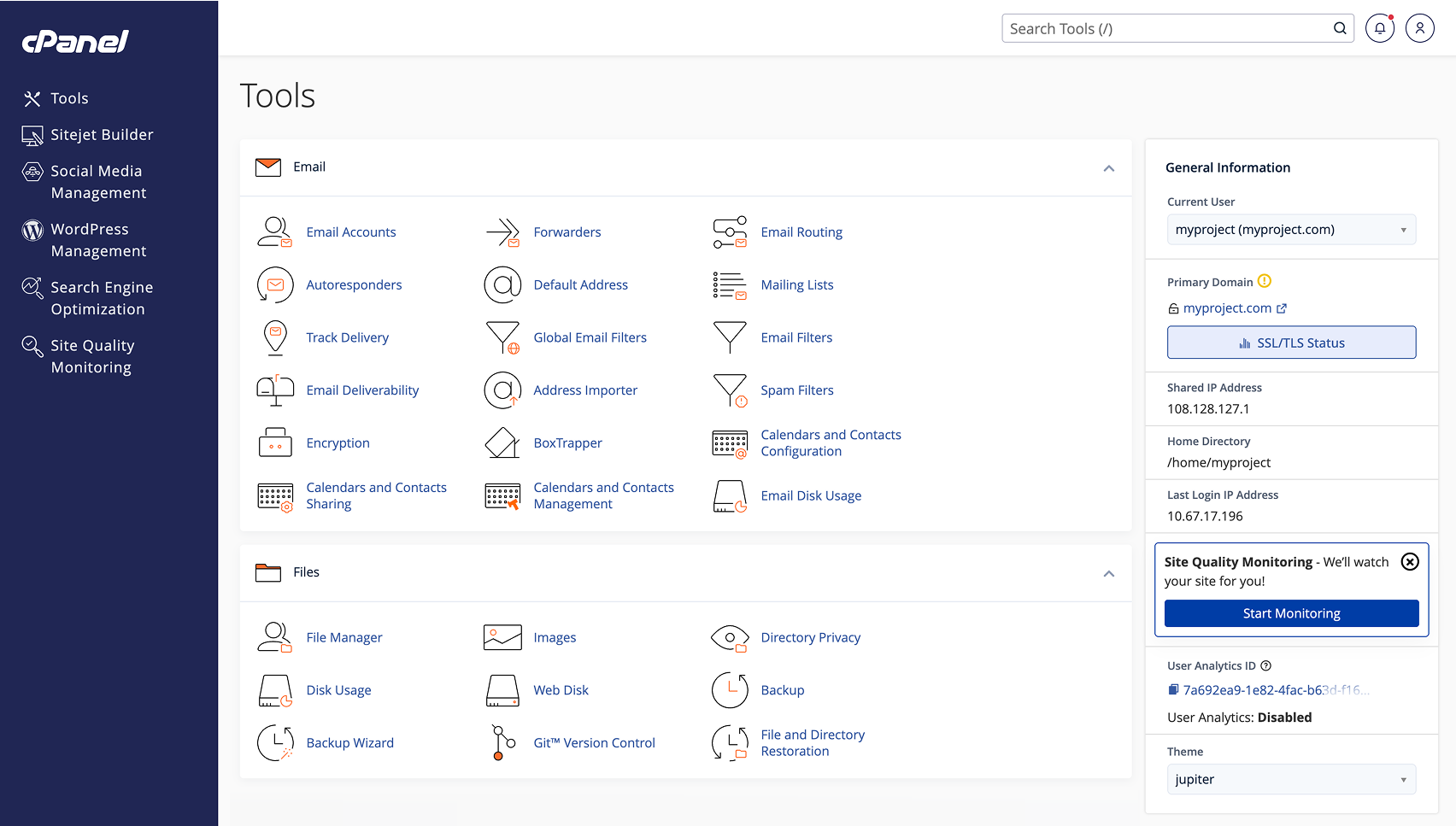
The cPanel interface is built on a modular principle: all tools are grouped into categories such as files, domains, email, databases, security, and statistics. Users access the panel through a browser, which makes it possible to manage hosting from any device.
The main idea of cPanel is maximum process automation. Most actions, from creating a database to connecting SSL, can be performed in just a few clicks. The panel supports integrations with popular CMS platforms, backup tools, and monitoring systems, making it a powerful control panel for complex projects.
Pros
The main advantages of cPanel include a convenient and logically structured interface that has been refined over the years and is familiar to many hosting users. The panel offers a wide set of features in its basic configuration, allowing users to manage files, domains, email, databases, and security without installing additional tools.
Another important advantage is the large number of integrations and third-party modules that extend the panel’s capabilities for specific tasks. Detailed documentation and an active user community are also worth noting, as they help solve most questions quickly. The combination of functionality and stable operation on most Linux servers makes cPanel a popular hosting panel for commercial projects.
Cons
Despite its popularity, cPanel also has some disadvantages. First of all, it requires a paid license, which affects the final cost of hosting for the user. On servers with limited resources, the panel can be quite demanding in terms of performance, which is not always the best option for small projects.
For complete beginners, the structure and number of tools may not be entirely obvious at first. In addition, deep custom settings often require an understanding of the server side, which limits flexibility for users without technical experience.
Who is cPanel suitable for?
cPanel is best suited for users who need a stable, time-tested hosting control panel with broad capabilities. It is convenient for owners of business websites, corporate resources, and online stores where reliability, security, and the ability to manage all project components from one interface are important.
The cPanel hosting control panel is also well suited for web developers and web studios that work with several websites at the same time and value process automation, integration with popular CMS platforms, and predictable server environment behavior. For users with basic or intermediate technical knowledge, cPanel makes it possible to quickly master hosting management and later scale the project without changing platforms.
Plesk
Plesk is a popular hosting control panel that is often considered a full alternative to cPanel. It stands out for its modern approach to server management, flexibility, and broad support for different technologies. Thanks to this, Plesk is actively used both on classic web hosting and on VPS and dedicated servers.
Plesk overview
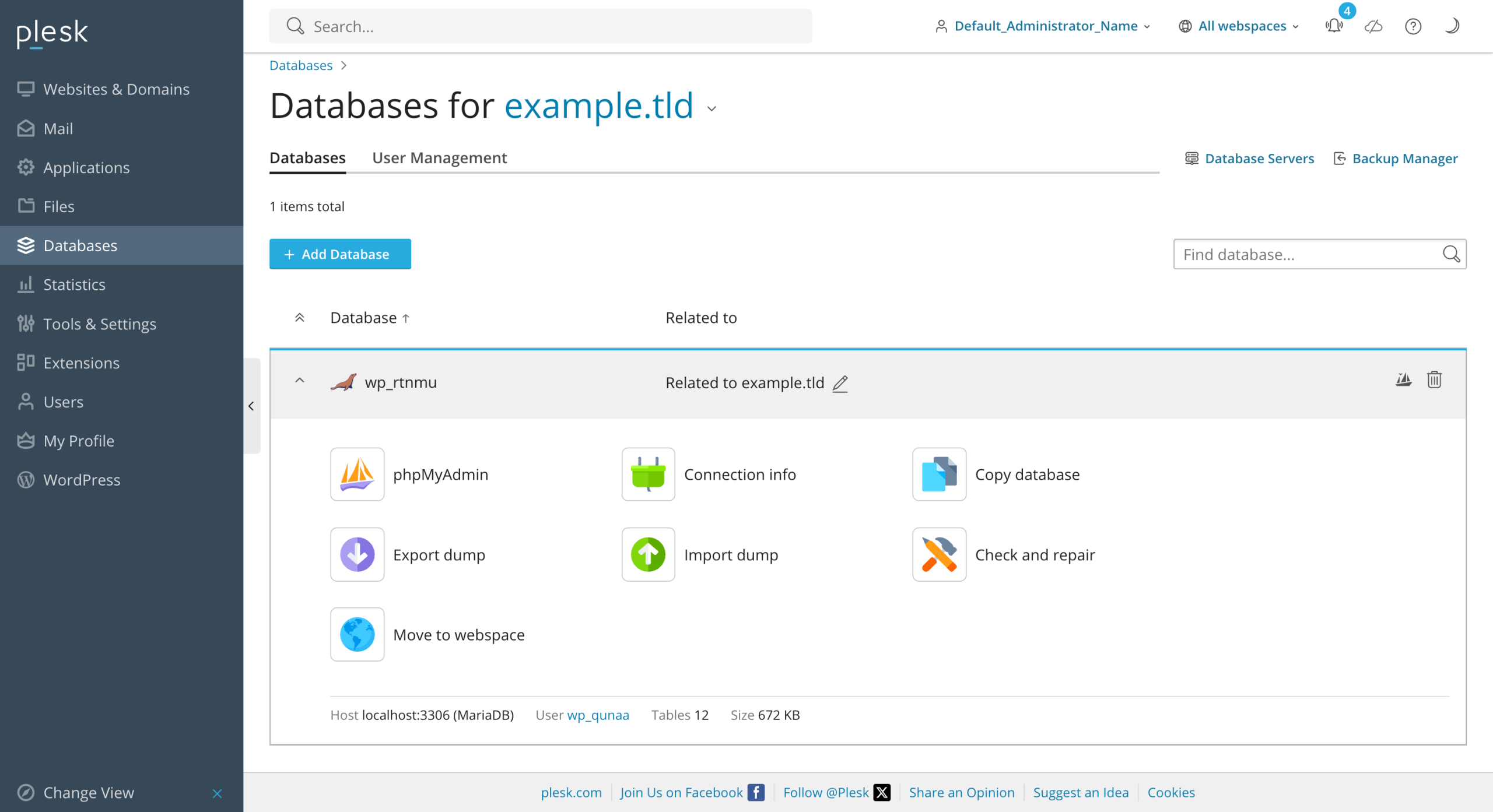
The Plesk interface has a modern, minimalist design and a logical structure. All main tools are concentrated in a single workspace, which simplifies navigation and project management. One of its key features is support for different operating systems: Plesk hosting can work on both Linux and Windows servers, which significantly expands its area of use.
The overall approach of Plesk is focused on centralized management of websites, domains, databases, and security services. The panel integrates well with popular frameworks, containers, and development tools, making it a powerful hosting panel for modern web projects.
Pros
Among the main advantages of Plesk are its modern and clear interface, which looks more up to date compared to classic panels. An important advantage is support for both Windows and Linux servers, which many competitors do not offer. In addition, Plesk is convenient for developers thanks to built-in tools for working with Git, Docker, and various programming languages.
If a team uses repositories and regular code updates, it is also worth considering the general approach to website deployment on hosting via Git. In such scenarios, Plesk can be more convenient for developers than simpler control panels.
Cons
The disadvantages of Plesk include its paid licensing model, which affects the final hosting cost. For beginners, some settings may seem more complex compared to simplified control panels. Also, when advanced features are actively used, Plesk may require more server resources.
Who is Plesk suitable for?
Plesk is an optimal solution for developers, agencies, and businesses that work with different technologies and need flexible hosting management. It is suitable for Windows hosting projects, complex web applications, and users who need a modern control panel with scaling options and integration with professional tools.
Plesk is also often chosen for projects hosted on VPS servers or dedicated infrastructure, where flexibility, control, and advanced server environment settings are important.
hPanel
hPanel is a custom hosting control panel developed by a hosting provider as an alternative to classic universal solutions. The main idea of hPanel is to simplify website and hosting management for users without technical experience. Unlike universal panels, it is tightly integrated with the provider’s infrastructure and focused on a fast start.
hPanel overview
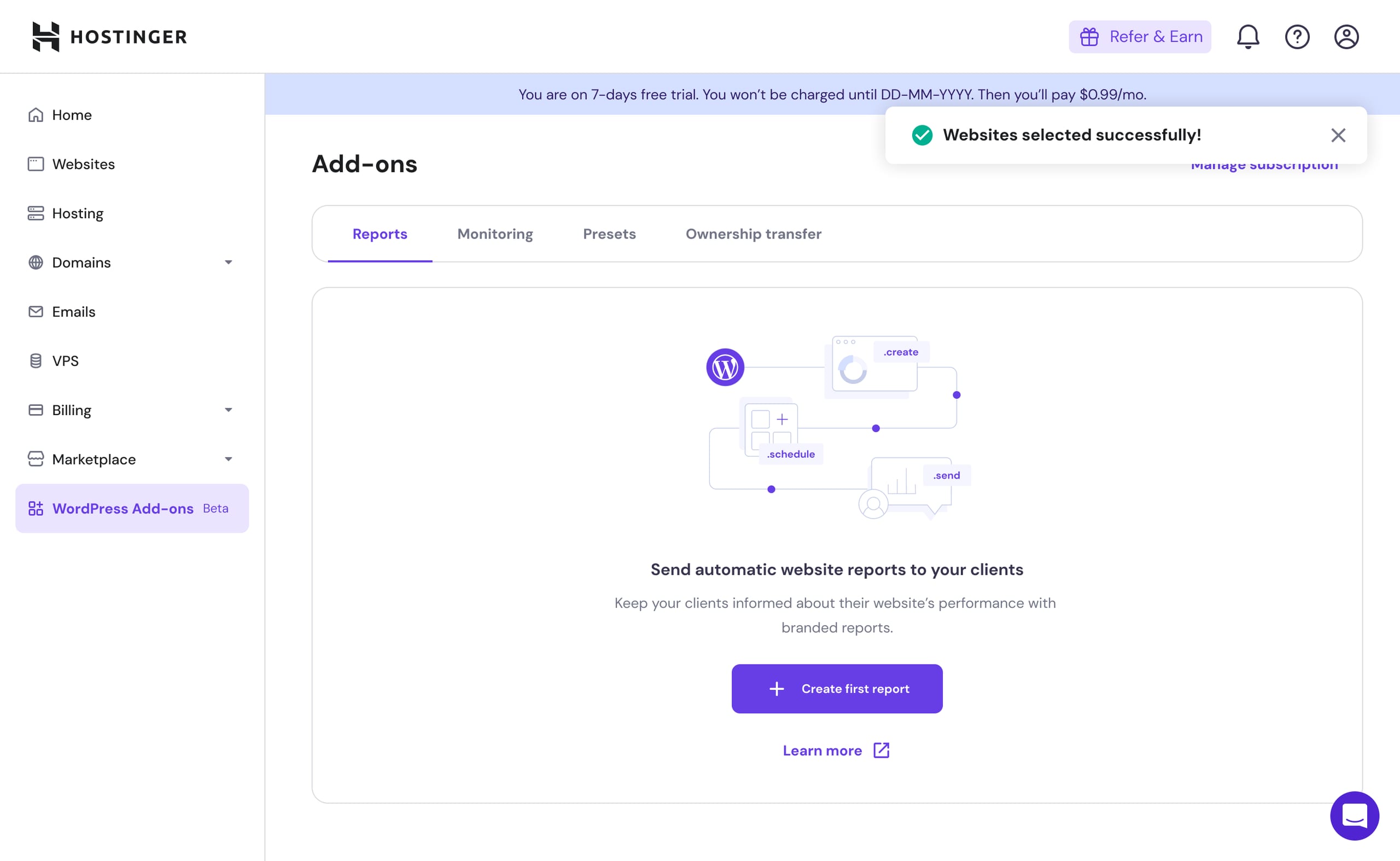
The hPanel interface has a modern, minimalist look and a logical structure, where all key tools are collected in one place. The philosophy of this control panel is “nothing unnecessary”: the user sees only the functions that are really needed to launch and maintain a website.
Among the main features of hPanel are file and domain management, mailbox creation, database management, SSL certificate connection, and backups. Many processes are automated, which allows standard actions to be performed in a few clicks without complex technical settings.
Pros
The main advantage of hPanel is simplicity and clarity. The panel works quickly, is not overloaded with complex modules, and is well suited for users who are dealing with hosting for the first time. Thanks to optimization for a specific provider, the hosting control panel ensures stable operation and an intuitive user experience.
Cons
Among the limitations of hPanel is its connection to a specific hosting provider: transferring a project to another host may require adapting to another panel. hPanel also usually has fewer advanced and deep settings, which can be critical for complex or non-standard projects.
Who is hPanel suitable for?
hPanel is ideal for beginners, owners of small websites, landing pages, and simple business projects that need to launch quickly without going deep into technical details. It is a good solution for those who need a simple and clear hosting panel for basic website management and do not plan complex server configurations.
For simple projects, shared hosting may also be sufficient, where the control panel is already configured by the provider and covers the basic tasks of the website owner.
Comparison of cPanel, Plesk, and hPanel
Below is a general comparison of three popular hosting control panels by key criteria: convenience, functionality, price, and complexity level. This will help you quickly understand which hosting control panel is best suited for your project.
| Criterion | cPanel | Plesk | hPanel |
|---|---|---|---|
| Convenience | Time-tested, logical interface familiar to many users | Modern minimalist design, but slightly more complex for beginners | Intuitive and simple, focused on beginners |
| Functionality | Very broad feature set and integrations, supports all basic tasks | Broad functionality, Windows and Linux support, integration with developer tools | More limited functionality, sufficient for small websites and basic projects |
| Price | Paid license that increases hosting cost | Paid license, depends on OS and number of websites | Usually included in hosting cost without extra payments |
| Complexity level | Medium, requires some experience for advanced settings | Medium/high, some features are difficult for beginners | Low, quickly mastered even by beginners |
The table shows that cPanel is suitable for those who value stability and broad functionality, Plesk is suitable for projects with different operating systems and advanced requirements, while hPanel is suitable for beginners and small websites where simplicity and a quick start are important.
This comparison helps you choose the best hosting control panel for a specific project without spending time testing all available solutions.
How to choose a hosting control panel? Recommendations from Hostpark experts
The choice of a hosting control panel depends on the user’s experience, website type, and functionality needs. If you are just starting to work with web hosting, it is important to choose a simple and intuitive hosting panel that allows you to launch websites quickly without technical difficulties. In this case, hPanel may be the best choice, as it is focused on beginners and small businesses and allows all basic tasks to be performed in a few clicks.
For users with intermediate technical knowledge and owners of business websites or online stores, cPanel or Plesk are more suitable. They provide a wide range of functions, support for various CMS platforms, and advanced capabilities for working with databases, domains, and security. It is also important to consider the server operating system: cPanel works only on Linux, while Plesk supports both Linux and Windows.
Another important aspect is price and licensing policy. Some panels require separate license fees, which affects the cost of hosting, while custom solutions are often included in the plan. It is also worth assessing the need for integrations and advanced settings: if you plan a complex or scalable project, it is better to choose a more functional hosting control panel such as cPanel or Plesk, while hPanel may be enough for small websites and simple landing pages.
If the project is already running and you need to change the provider or server environment, before choosing a panel it is worth studying how to transfer a website to another hosting provider. This will help you understand in advance which data, databases, domains, mailboxes, and panel settings must be preserved during migration.
After launching a website, it is also important not to rely only on the control panel. For stable project operation, it is useful to set up website monitoring to notice availability, server, or performance issues on time.
Thus, when choosing a control panel, you should focus on your level of experience, website type, required functionality, and budget. This will help you select the most convenient and effective hosting control panel for a specific project.
Conclusion
The choice of a hosting control panel directly affects website administration convenience, project launch speed, and the efficiency of server management. cPanel remains a classic solution for those who value stability, broad functionality, and Linux server support, while Plesk is ideal for projects that need flexibility and support for both Linux and Windows. hPanel stands out for its simplicity and intuitive interface, making it a convenient option for beginners and small websites.
The right control panel helps not only save time on routine tasks but also ensure reliable website operation and future scalability. By focusing on your experience level, project type, and required functionality, you can choose the optimal hosting control panel that fully matches the website’s tasks.