
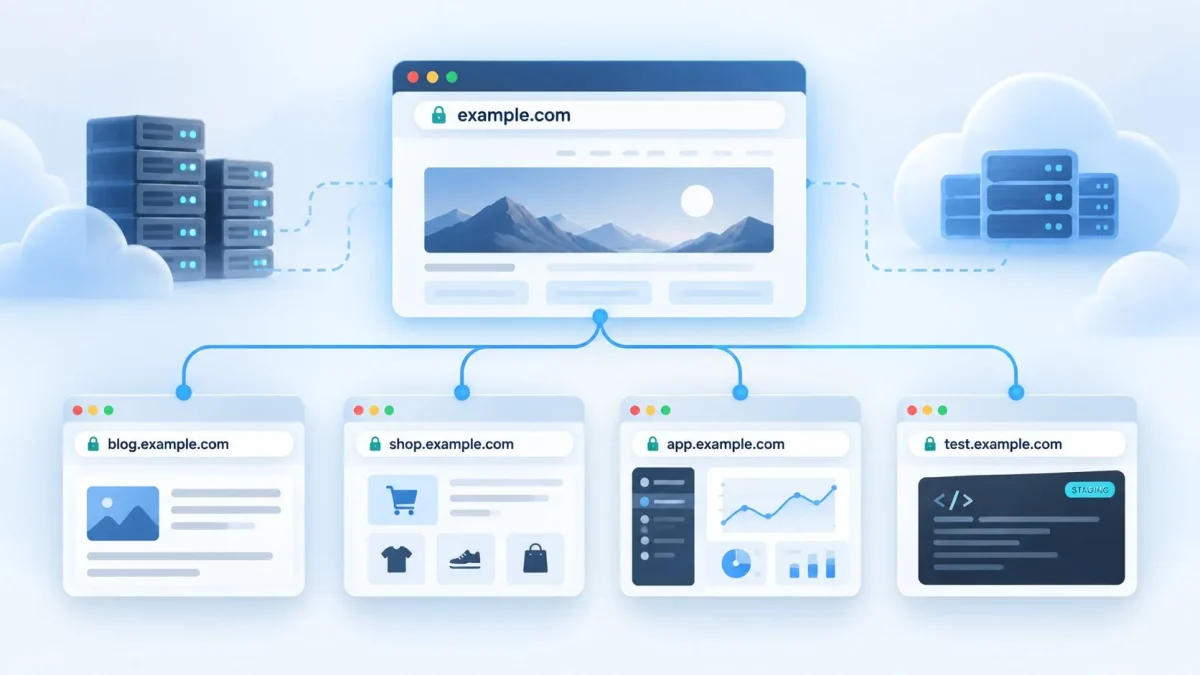
As a website grows, its structure often becomes more complex: a blog, online store, customer account, staging environment, separate service, or language version may appear. One way to logically and technically separate these parts is to create a subdomain. It allows you to use the main domain name while having a separate address for a specific section or service.
For example, if the main website is available at example.com, the blog can be hosted at blog.example.com, the store at shop.example.com, and the customer account at account.example.com. Each such name can have its own DNS settings, server configuration, and even operate on separate infrastructure.
To better understand what a subdomain is, it is important to first understand the structure of a domain name. DNS has a hierarchical structure: a domain can contain other domains at lower levels. In the practical web context, a subdomain usually means an additional name created within an existing domain space. You can learn more about website address structure and how domains work in the Hostpark article “Domain names in simple terms: what are they and how do they work?”.
In this article, we will explain whether a subdomain is a separate website or simply part of an address, what it is used for, how it differs from a subdirectory, how to create a subdomain through a hosting control panel or DNS, and what should be checked after configuration.
What Is a Subdomain?
A subdomain is a domain located below another domain in the DNS hierarchy. In web development and administration, the term subdomain is commonly used to describe the same concept.
The easiest way to understand the structure is with an example. In the address blog.example.com, the domain example.com is the parent of blog.example.com, while the label blog creates an additional level. Similarly, shop.example.com can be used for an online store, support.example.com for a support center, and dev.example.com for a development environment.
The main domain and subdomain are connected within the DNS hierarchy, but they do not have to operate as one website. The main resource example.com may be built on WordPress and run on one server, while app.example.com can be a separate web application running on different infrastructure. DNS allows these names to be independently directed to the required resources.
The key practical difference between a registered domain and a subdomain created within it is that for example.com, you first need to obtain the right to use the domain name through a registrar. After that, you can manage the DNS zone and create additional names within the domain. If the domain has not yet been registered, you can first register a domain name with Hostpark and then configure its DNS.
There is usually no need to register blog.example.com or shop.example.com as new independent domains. For the required name, you configure DNS and, if it is intended for a website or application, the corresponding configuration on the hosting service, web server, reverse proxy, CDN, or external platform. In some architectures, a separate DNS record is created for the subdomain; in others, a wildcard or a separately delegated DNS zone may be used.
Sometimes blog.example.com is called a third-level domain: .com is the top-level domain, example is the next level, and blog is another level. However, this numbering is not always convenient. For example, example.com.ua already contains an additional level in its structure. Therefore, in practical work, it is more useful to focus on the parent domain and the specific name created within it.
A subdomain should also not be confused with a separate page or folder of a website. The address example.com/blog/ is a URL path within the hostname example.com, whereas blog.example.com has a different hostname. This distinction affects DNS, web server configuration, SSL/TLS, analytics, and other technical settings.
| Example address | What it is | Explanation |
|---|---|---|
| example.com | Main domain | The project’s base domain name |
| blog.example.com | Subdomain | A separate name within the example.com domain |
| example.com/blog/ | Subdirectory | A URL path within the same example.com hostname |
So, to put it as simply as possible, a subdomain is a way to create an additional address within an existing domain space. It is useful when part of a project needs to be logically or technically separated without registering a new independent domain.
What Are Subdomains Used For?

Subdomains are used when a particular direction, service, or environment should be separated from the main resource. The reason may be a different CMS, a separate server, an independent deployment cycle, an external SaaS platform, its own access rules, or a different technical architecture.
The most common subdomain use cases include:
- Blog. The address blog.example.com can be used if the blog operates separately from the corporate website, for example, on a different CMS or platform. If there is no technical separation, the blog can also be organized as example.com/blog/.
- Online store. Shop.example.com is useful when the ecommerce section runs on a separate platform or requires its own server configuration.
- Customer account or application. Account.example.com or app.example.com can be used for a separate product component where users log in and work with their data or settings.
- Testing environment. Dev.example.com, test.example.com, or staging.example.com can be used to test changes before they are deployed to production. Such an environment should be protected with actual access controls if it is not intended for public access.
- Separate technical service. Api.example.com, docs.example.com, support.example.com, or files.example.com can be used for an API, documentation, knowledge base, file service, or another independent component.
- Language or regional version. En.example.com, pl.example.com, or de.example.com can be used for localized versions. An alternative approach is to use subdirectories such as example.com/en/, example.com/pl/, etc.
In each case, a subdomain creates a separate hostname and allows the corresponding part of the infrastructure to be managed independently. For example, app.example.com can be updated separately from the corporate website, while docs.example.com can be directed through DNS to an external documentation platform.
At the same time, there is no need to create a subdomain for every small section. If the pages are a regular part of the main website, use the same CMS, and do not require separate technical configuration, a subdirectory is often a simpler solution.
Every public subdomain also needs to be administered. It may require DNS, server configuration, HTTPS, analytics, monitoring, backups, and separate access rules. Therefore, technical separation should solve a specific problem rather than create unnecessary complexity.
Subdomain or Subdirectory: Which Should You Choose?
A subdomain and a subdirectory can both be used to logically divide a project, but technically they are different structures. A subdomain has the format blog.example.com, while a subdirectory has the format example.com/blog/. In the first case, it is a separate hostname; in the second, it is a path within the same hostname.
A subdirectory is usually convenient when the content directly belongs to the main website. Company news, articles, case studies, categories, or service pages on the same CMS often have no technical reason to be moved to a separate hostname.
A subdomain is appropriate when technical autonomy is required. For example, the main website may run on WordPress while the customer account is built as a separate application. In this situation, app.example.com can point to another server or platform and be maintained independently.
A similar scenario is possible with documentation. If it runs on a specialized SaaS platform, docs.example.com can often be connected through DNS without changing the architecture of the main website.
| Criterion | Subdomain: blog.example.com | Subdirectory: example.com/blog/ |
|---|---|---|
| DNS | May require separate DNS configuration | No separate DNS name is required for the section |
| Hosting | Can run on another server or platform | Usually runs as part of the main website |
| CMS and technologies | Can be completely different | Shared technologies are more common |
| SSL and server | Need to ensure that the hostname is covered by the certificate and server configuration | Usually uses the configuration of the main hostname |
| Typical use cases | Application, staging, documentation, API, separate service | Articles, services, news, categories, and other main website content |
From an SEO perspective, there is no universal rule that a subdomain is always worse or better than a subdirectory. Google states that there is no general advantage to either option in terms of indexing and ranking. Therefore, the structure should primarily be chosen according to the project’s architecture and ease of administration.
At the same time, a subdomain is a separate hostname, so its technical SEO parameters need to be monitored separately: accessibility for search engine crawlers, sitemap, robots.txt, canonical, hreflang where necessary, internal linking, and the absence of unwanted duplicates.
If the structure is already stable, moving a large section from a subdirectory to a subdomain or vice versa solely because of an assumed SEO advantage is not recommended. Such a change effectively changes the URLs and requires proper migration, redirects, and reprocessing of the addresses by search engines.
Therefore, a subdomain is logically suited to functionally or technically separate components, while a subdirectory is better for content that is a direct continuation of the main website.
How to Create a Subdomain?
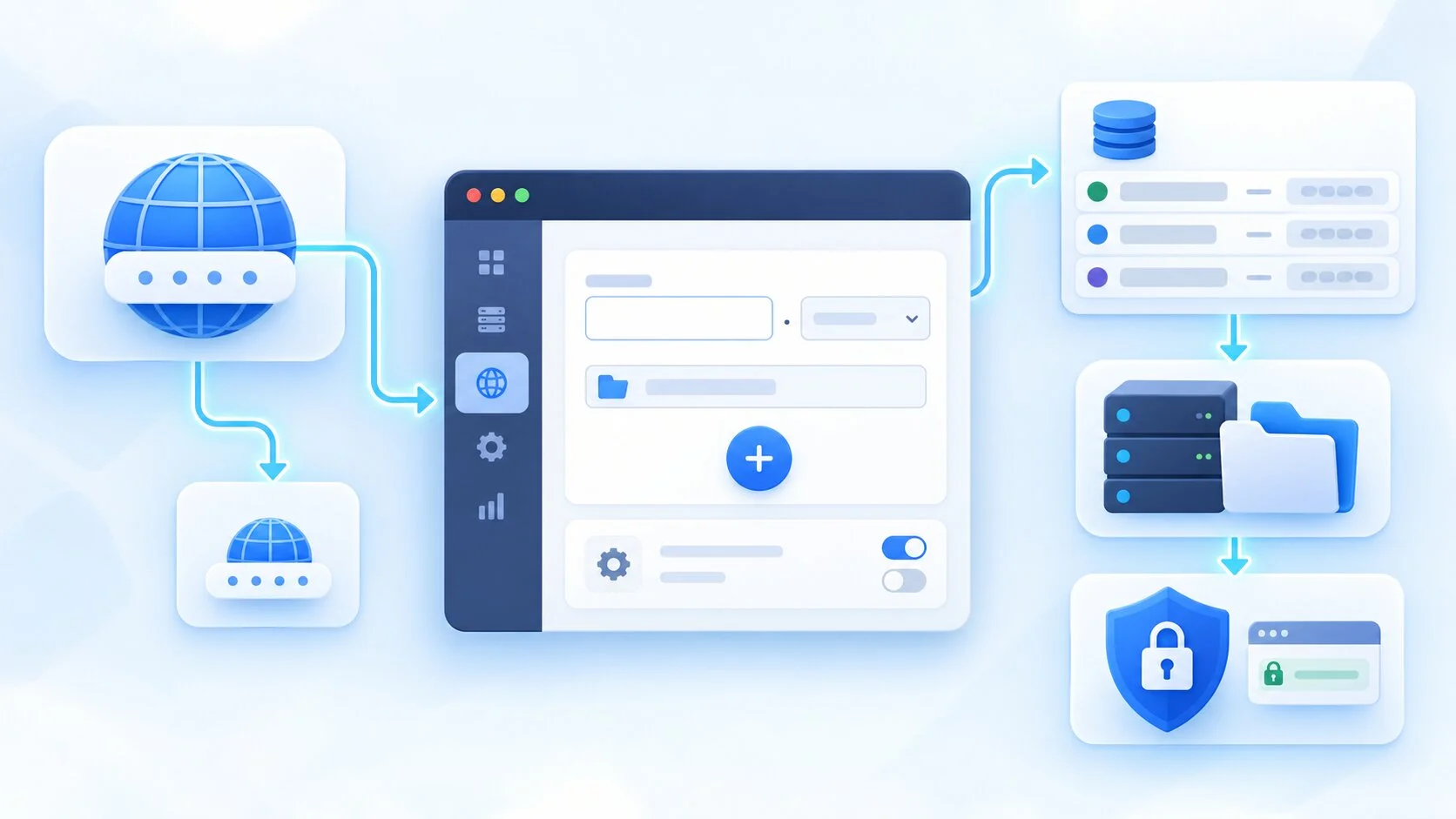
To launch a web resource on a subdomain, you need to solve two tasks: configure DNS so that the name points users to the required infrastructure, and configure the server or external platform so that it recognizes the hostname.
If the resource runs on hosting with a control panel, some operations can be performed through a graphical interface. If the subdomain needs to point to another server, CDN, or SaaS platform, DNS usually needs to be configured separately.
Before starting, determine the name and purpose of the address. For a blog, it could be blog.example.com; for an application — app.example.com; for staging — staging.example.com. For public addresses, it is better to use short and stable names because they may appear in documentation, search indexes, and external links.
Creating a Subdomain Through the Hosting Control Panel
Many server or web hosting control panels provide tools for working with domains and subdomains. The exact interface depends on the software and service configuration. The general principle of how such systems work can be found in the Hostpark article about hosting and server solutions.
A typical sequence of actions looks like this:
- Log in to the control panel. You need an account where the main domain is already connected or the relevant server is configured.
- Open domain or website management. The section name depends on the control panel: Domains, Websites & Domains, Subdomains, or a similar option.
- Select the required domain. If multiple projects are running on the server, make sure the new name is created within the correct domain space.
- Enter the subdomain name. For blog.example.com, many control panels only require you to enter blog, after which the system generates the full name.
- Configure the directory or application. If the resource runs on the same server, a separate document root or appropriate server configuration is usually defined for a separate website.
- Check DNS. Some control panels can create the record automatically, but only if they actually manage the required DNS zone. Otherwise, the record must be created separately with the DNS provider.
- Connect the website or service. Once the hostname is configured, you can upload files, install a CMS, configure a reverse proxy, or connect the required application.
The server control panel and authoritative DNS may be managed by different systems. For example, the website may run on one server while the DNS zone is managed by a registrar or specialized DNS provider. In that case, creating the hostname on the server will not automatically change DNS.
The opposite situation is also possible: DNS already points blog.example.com to the correct IP address, but the web server does not have a virtual host or another configuration for this name. Instead of the required website, a default host, another project, or an error may appear.
If the project runs on shared hosting, the ability to add domains and subdomains depends on the specific provider and tariff plan. With a VDS or dedicated server, the administrator usually has more control but is also responsible for configuring the web server, DNS, and SSL unless otherwise provided by the service.
How to Create a Subdomain Through DNS?
DNS configuration is required to associate a hostname with a server or another platform. Before making changes, determine where the domain’s authoritative DNS zone is actually managed. It may be a registrar, DNS provider, CDN, or another platform. The Hostpark article “DNS for beginners: how records work and why they are indispensable” provides more information about how DNS records work.
For a typical web subdomain, A, AAAA, or CNAME records are most commonly used.
An A record associates a name with an IPv4 address. For example, for blog.example.com, you can create an A record whose value is the server’s IPv4 address. The server must then be configured to accept HTTP/HTTPS requests specifically for blog.example.com.
An AAAA record performs the same function for IPv6. If the service is correctly accessible through both IPv4 and IPv6, A and AAAA records can exist simultaneously for the same hostname.
A CNAME is used when a name should be a DNS alias for another domain name. For example, a SaaS platform may provide a technical hostname and ask you to create a CNAME for docs.example.com pointing to that address.
It is important to note that a CNAME is not an HTTP redirect. The browser does not follow it to another URL. The DNS resolver finds the canonical name and continues DNS resolution, while the user may still see docs.example.com in the browser.
The record type should be selected according to the architecture and the instructions of the target service. If the platform specifically requires a CNAME, do not replace it with an A record pointing to an IP address you found yourself: the provider may change its infrastructure.
In different DNS panels, the Name or Host field may be filled in differently. Some interfaces require only blog, while the interface automatically adds example.com; others require the full name. Before saving, check which FQDN the panel will actually create.
A DNS record alone does not create a website. It only helps locate the required network resource. The hostname must also be added to the configuration of the server, CDN, or SaaS platform, and an appropriate certificate must be provided for HTTPS.
What Should You Consider After Creating a Subdomain?
After configuration, you need to check more than just whether the address opens in a browser. For correct operation, DNS must return the required resource, the server must correctly process the hostname, and HTTPS must use a certificate valid for that name.
First, check DNS. An A record should return the correct IPv4 address, an AAAA record the IPv6 address, and a CNAME the expected canonical domain name. If DNS points to the wrong location, changes to the web server configuration will not solve the problem.
Next, open the resource and make sure the server returns the correct website or application. If blog.example.com displays the main website, the server’s default page, or another virtual host, check the server name, document root, reverse proxy, or platform configuration.
Also check HTTPS separately. The certificate must contain the specific name blog.example.com or an appropriate wildcard. A certificate issued only for example.com does not automatically become valid for blog.example.com.
A wildcard such as *.example.com can cover first-level names such as blog.example.com, shop.example.com, or app.example.com. The domain example.com itself and deeper names such as api.dev.example.com are not automatically covered by this wildcard — they require appropriate additional names or another certificate.
For more information about how TLS and certificates work, see the relevant Hostpark material on SSL certificates and HTTPS.
You should also check redirects from HTTP to HTTPS. For a public web resource, after TLS is correctly configured, the HTTP version is usually redirected to HTTPS. At the same time, redirect loops caused by conflicting rules on the web server, CDN, and CMS should be avoided.
If a DNS record has just been changed, some users may receive the old response from the cache for a while. This is caused by the TTL of the previous record and the behavior of caching DNS resolvers. Therefore, if one network already shows the new IP address while another still shows the old one, this may be normal for some time.
For a staging or development subdomain, access control should be configured separately. Simply keeping the address unknown is not a security measure. If the test resource is not intended for public access, it is better to use authentication, a VPN, IP filtering, or another appropriate mechanism. robots.txt or noindex can be used to control indexing, but they do not replace access control.
For a production service, also check analytics, monitoring, backups, and alerts. If the subdomain runs on a separate server or in another application, the existing settings of the main website may not apply to it.
Common Mistakes When Creating a Subdomain
Incorrect DNS record. An A or AAAA record may contain an outdated IP address, while a CNAME may contain the wrong target service name. Troubleshooting should start by checking the actual DNS response.
The record was added to the wrong DNS zone. The domain may be registered with one company, the server may be located at another, and DNS may be managed through a third service. Records must be changed where the authoritative DNS zone for the domain is hosted.
The subdomain points to the wrong server. If the A or AAAA record contains an incorrect address, another website, a default virtual host, or a connection error may appear.
The hostname has not been added to the server. Even correct DNS does not guarantee a correct web server response. For blog.example.com, you need to create the appropriate virtual host, server block, reverse proxy route, or add the custom domain to the external platform.
The wrong directory was selected. If the new hostname is accidentally directed to the document root of the main website, two different addresses may display the same content. For a separate resource, the correct directory or server routing must be defined.
The SSL certificate is missing or incorrectly configured. HTTP may work while HTTPS displays an error if the certificate does not include the required hostname or is installed on the wrong endpoint that terminates the TLS connection.
DNS cache after changing a record. If the previous DNS response is still stored in a recursive resolver’s cache, some users may temporarily receive the old value until the TTL expires.
Incorrect CDN or reverse proxy configuration. If an intermediate platform is used in front of the origin server, the new hostname often needs to be added there as well, with TLS configured and the correct origin specified.
Unprotected staging environment. A test copy may contain internal information, test accounts, or unfinished features. If it is not intended for public access, it should be protected with a real access mechanism and, once the work is complete, removed or deactivated if it is no longer needed.
Deleting a subdomain without checking dependencies. An old hostname may be used by APIs, webhooks, integrations, documentation, external links, or users. Before deleting a DNS record, check its dependencies and, for public URLs, configure a redirect to the current address if necessary.
Conclusion
A subdomain is a domain name located below another domain in the DNS hierarchy. For example.com, you can create blog.example.com, app.example.com, staging.example.com, and other addresses. In practice, this allows different project components to be logically and technically separated without registering a separate independent domain for each one.
The choice between a subdomain and a subdirectory primarily depends on the architecture. If the new section is a regular part of the main website and runs on the same platform, a subdirectory is often simpler. If the component has its own server, application, external platform, separate deployment cycle, or access rules, a subdomain may be more practical.
For a typical web subdomain, both the DNS and server sides need to be configured. An A record is used for IPv4, AAAA for IPv6, and CNAME when the name should be a DNS alias for another hostname. After that, you need to check whether the server accepts the new name, whether HTTPS works, and whether the certificate is valid specifically for that hostname.
If the domain for your project has not yet been registered, Hostpark provides domain registration services. The company also offers server and cloud solutions for hosting separate websites and applications. The specific DNS, web server, and subdomain configuration should be selected according to the architecture of the project itself.